The version of PowerGramo you just installed is 6.0.2.32.
In this version, we made following major updates:
1 . Brand new user interface design with major user interface
embedded into Skype window.
2 . Re-designed software architecture makes the program
run much stabler than old versions.
3. In place memoire editing.
4. Expanded call record list window makes managing records
even easier.
5. Stand alone PowerGramo Player used to play records whitout
logging into Skype.
6 . Major bugs fixed.
Confirm PowerGramo's access to Skype(*IMPORTANT*)
On finishing installation, for the first time you start PowerGramo,
Skype will ask you if PowerGramo is allowed to connect with
skype. Arrange of skype user interface for this authorization
depends on the version of skype you use.
For skype version 4.x, you will
see a message directly on the main skype window, shown as
the following image:

Click the "Allow access" button in the message window.
For skype version 3.8, the program
does not show the authorizing window directly when PowerGramo
try to connect. It shows a slip window near the windows taskbar,
as follows:
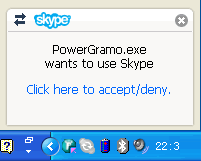
Clicking on the slip window will bring forth the Skype main
window with new events displayed below the menu bar, as the
following image shows:
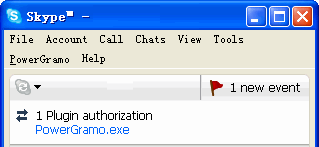
Among the events, click one named
PowerGramo.exe,
the authorizing window will show.
For skype version earlier than 3.8,
you will see a warning message from Skype as shown below:
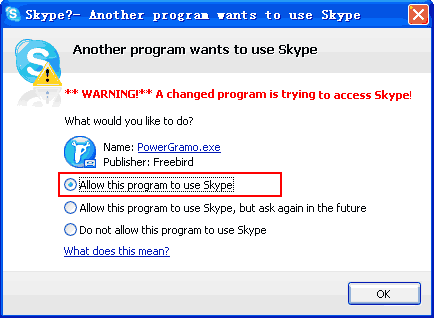
It is asking whether PowerGramo is allowed to access Skype.
Select the "Allow this program to use Skype" option
as indicated above and click then button "OK".
NOTE: If you
accidentally choose a wrong option, PowerGramo will be unable
to connect to skype, saying "
The
connection request to Skype was rejected.....".
When this happen, please go to Skype's "Options"
window to remove PowerGramo from the blacklist. Generally
you can reach the blacklist by first finding in the Skype
"Options" window a link named "
Manage
other programs' access to Skype" and click the
link. The latest version of skype has this link grouped in
"
Advanced Settings".
If this is your first time to use PowerGramo, the
first
tour may be helpful for you.
We wish you have a pleasant experience with PowerGramo and
hope it can be your everyday tool that enriches your communication
experience and improves your productivity.
Do not hesitate to contact us
if you have any suggestions or questions.